Popcorn for TeamCity
Know your build broke before you’re back at your desk. Popcorn is an iPhone and iPad app for TeamCity. See whether a build passed, read its log while it runs, find the tests that failed, and re-run or cancel it from your phone.
Download on the App Store. One purchase, no subscription.
What you can do
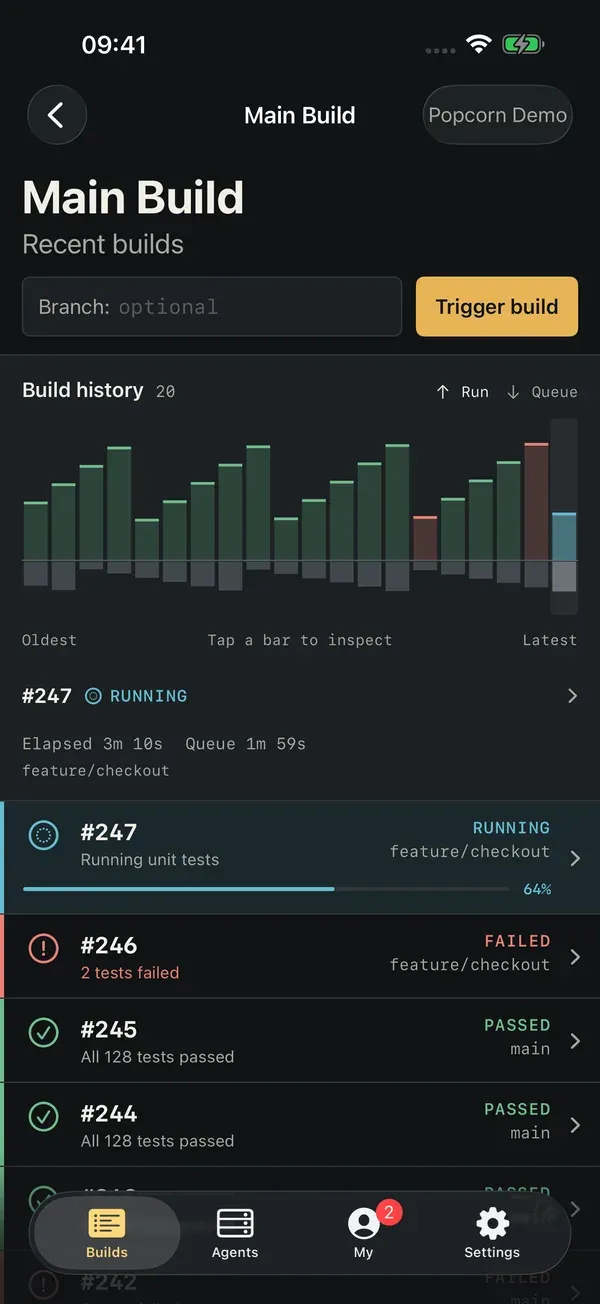
- See every build. Browse projects and configurations, and see recent builds across branches with status and progress. A chart of the last 20 builds splits run time from queue time, so slow queues stand out.
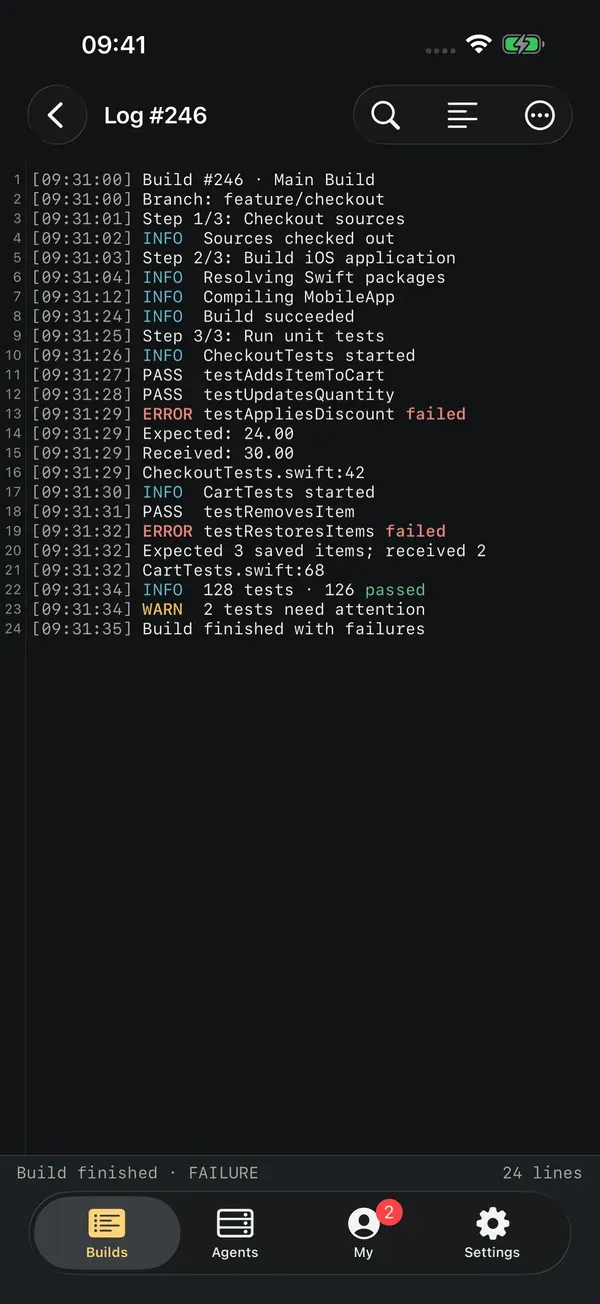
- Read live logs. Follow output as it arrives, search it, and switch line wrapping.
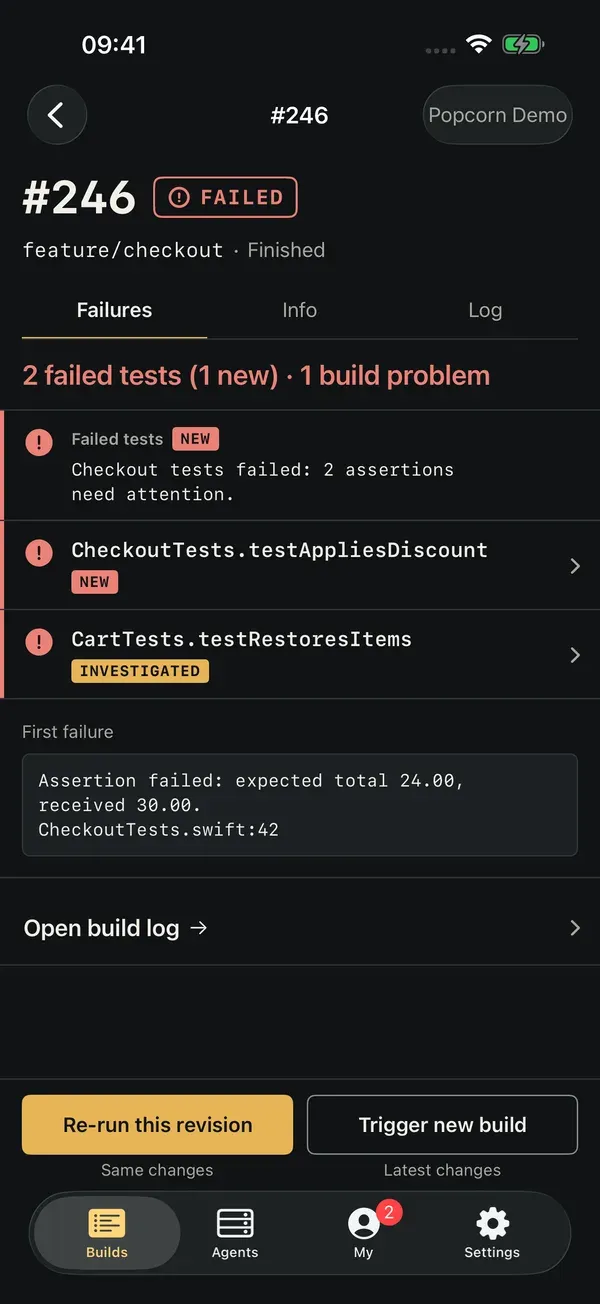
- Find out why it failed. Build problems and failed tests, new failures first, with error messages and stack traces when your server has them.
- Start, re-run or cancel. Trigger a build on any branch, run it with custom parameters or a specific agent, re-run the same revision, or cancel a queued or running build.
- Watch your agents. Agents grouped by pool, with busy, idle and offline filters.
- Follow your investigations. The investigations assigned to you, grouped by project.
- Glance at the Home Screen. A widget shows one configuration’s latest build.
Your server, your token
Popcorn works with TeamCity Cloud and with self-hosted TeamCity over HTTPS. You sign in with a personal access token, which Popcorn keeps in the iOS Keychain. Requests go straight from your device to your server. There is no Popcorn account, no Popcorn server, and no analytics or advertising code in the app.
Pricing
Popcorn is a one-time purchase with no subscription and no in-app purchases. Your TeamCity service is separate. If you’d like to try it on your own server before buying, email support@stephanvs.com and I’ll send you a free copy.
Questions
Does it work with self-hosted TeamCity?
Yes, as long as the server uses HTTPS with a valid certificate. For a server on a private network, connect your phone to the same Wi-Fi or VPN first.
What permissions does the token need?
Read access is enough to view builds, logs and agents. Starting and cancelling builds needs the matching TeamCity permissions. Read how to create a read-only TeamCity token for a safe first setup.
Can I try it with my whole team?
Yes. Email support@stephanvs.com and I’ll send free copies for your team to try. Companies can buy the app for a team through Apple Business Manager.
Support
Email support@stephanvs.com for help. Include your app version, iOS version, and a description of the problem. Please remove access tokens, passwords, confidential project names, and sensitive build information from anything you send.
Connect to TeamCity
- Open your TeamCity server in a browser and sign in.
- Create a personal access token in your TeamCity profile with the permissions you need. Your TeamCity administrator may need to enable access or grant permissions.
- For TeamCity Cloud, enter your instance name, for example
my-teamforhttps://my-team.teamcity.com. HTTPS and.teamcity.comare added automatically. For a self-hosted server, enter its HTTPS URL. - Enter your token and connect. Tokens are stored in the iOS Keychain and sent directly to your TeamCity server.
You need an existing TeamCity Cloud account or a self-hosted TeamCity server over HTTPS, an internet connection, and iOS 17 or later. Plain HTTP is not supported.
I cannot connect
Check that your server opens in a browser over HTTPS, that the address is correct, and that your personal access token has not expired or been revoked. For TeamCity Cloud, enter just the part before .teamcity.com. Confirm your token’s permissions with your administrator.
A build action is unavailable
Starting and cancelling builds requires the corresponding TeamCity permissions. Agent status and investigations are read-only in Popcorn.
How do I remove a connection?
Open Settings and remove the saved server. This deletes its profile and Keychain token from this device. Remove each server before uninstalling if you want to clear its credentials: Keychain items can persist after uninstalling. You can also revoke the token in TeamCity.
Press kit
Popcorn is an independent iPhone and iPad client for TeamCity, made by Stephan van Stekelenburg.
Short description. Popcorn brings TeamCity to iPhone and iPad. Check build status and history, follow live logs, see failed tests, and trigger, re-run or cancel builds. It connects directly to TeamCity Cloud or self-hosted servers with a personal access token. One-time purchase, no subscription.
Facts. Requires iOS 17 or later. Works with TeamCity Cloud and self-hosted TeamCity over HTTPS. No account, no tracking. Available worldwide in English.
Screenshots are on the App Store page. For anything else, email support@stephanvs.com.
Privacy and terms
Read the Popcorn privacy policy and terms of service.
Popcorn is an independent client and is not affiliated with or endorsed by JetBrains. TeamCity is a trademark of JetBrains s.r.o.